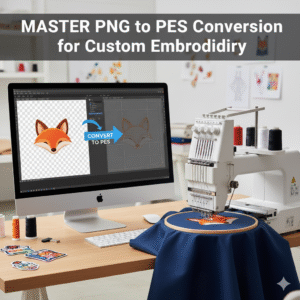
Embroidery digitizing transforms creative visions into reality, and PNG to PES conversion is a vital skill for newsniz.com’s creative readers. This guide explores how to convert PNG images into PES files for embroidery machines, enabling small business owners and DIY enthusiasts to craft personalized apparel, gifts, or branded merchandise. From understanding file formats to selecting tools and mastering the process, this article provides actionable steps and tips to elevate your embroidery projects and boost your creative or entrepreneurial journey.
What Are PNG and PES Files?
PNG and PES files serve distinct purposes:
- PNG: A raster format supporting transparency, ideal for digital logos or artwork but not machine-readable.
- PES: A vector-based format encoding stitch instructions for embroidery machines like Brother, Bernina, or Janome.
PNG to PES conversion bridges digital designs to physical stitches, making it essential for custom embroidery projects.
Why Learn PNG to PES Conversion?
This skill offers significant benefits:
- Customization: Create unique products like monogrammed towels or branded uniforms.
- Cost Savings: Digitize designs in-house, reducing outsourcing costs.
- Marketability: Offer niche products to attract customers on platforms like Etsy.
- SEO Advantage: Blog about your projects to rank for keywords like “PNG to PES”.
It’s a practical tool for newsniz.com’s entrepreneurial and DIY audience.
Choosing the Right Conversion Tools
Select software that fits your needs and budget:
- SewArt: Affordable, user-friendly for beginners.
- Ink/Stitch: Free, open-source, ideal for startups or hobbyists.
- Brother PE-Design: Advanced features for Brother machine users.
- Wilcom Hatch: Professional-grade for intricate, high-volume designs.
These tools simplify digitizing, ensuring high-quality PES files.
Step-by-Step PNG to PES Conversion
Follow this process for professional results:
- Prepare the PNG: Simplify colors and remove backgrounds using GIMP or Photoshop to reduce stitching errors.
- Import into Software: Load the PNG into your chosen tool.
- Digitize the Design: Trace shapes, assign stitch types (e.g., satin, fill), and adjust thread colors.
- Export as PES: Save the file in a format compatible with your embroidery machine.
- Test on Fabric: Stitch on scrap material to verify quality and make adjustments.
Each step ensures precision and vibrancy in your final product.
Tips for High-Quality Embroidery
Optimize your workflow with these strategies:
- Simplify Artwork: Use fewer colors for cleaner stitches and faster production.
- Check Machine Compatibility: Ensure the PES file matches your machine’s requirements.
- Convert to Vectors: Transform PNG to SVG before digitizing for sharper outlines.
- Preview Files: Use software to review PES files and catch errors early.
- Practice Stitch Settings: Experiment with density and patterns for professional finishes.
These tips help small businesses and crafters deliver standout products.
Business Applications of PNG to PES
For entrepreneurs, PNG to PES conversion opens doors:
- Niche Markets: Target audiences like pet owners or sports teams with custom designs.
- E-commerce Growth: Sell embroidered products on Etsy, eBay, or your website.
- Brand Building: Create branded merchandise to enhance visibility.
- Content Marketing: Share tutorials on your blog to drive traffic and SEO.
This skill empowers small businesses to innovate and compete.
Avoiding Common Pitfalls
Steer clear of these mistakes:
- Overcomplicated Designs: Too many colors or details can cause stitching issues.
- Ignoring Machine Limits: Verify your machine supports the PES file version.
- Skipping Tests: Always test stitches to avoid wasting materials.
- Neglecting SEO: Use keywords like “PNG to PES” in blogs to boost discoverability.
Proactive planning ensures smooth projects and satisfied customers.
Conclusion
PNG to PES conversion is a powerful skill for crafters and entrepreneurs, enabling unique, marketable embroidery projects. Explore more creative and business insights in newsniz.com’s lifestyle section and start with this PNG to PES guide to transform your ideas into reality. Join newsniz.com’s community to share your embroidery success!